
Parametric design studies#
This section describes how to define and manage design studies in optiSLang
through the ansys.optislang.parametric.design_study module.
Parametric design studies enable systematic exploration, sensitivity analysis, and optimization of design parameters and responses within a structured workflow created from various templates.
Design study manager#
The parametric design study module encapsulates the creation and execution of a design study, using a
ParametricDesignStudyManager instance,
operating on an Optislang instance. It may contain a single
or multiple parametric design studies.
To create a new parametric design study, create a template (see Parametric design study templates) and run
create_design_study() method. This generates
an instance of ParametricDesignStudy, that can be then used to
execute the created design study.
Design study#
To automatically execute a design study, use execute()
method, which runs in a blocking mode.
If a non-blocking execution is desired, use start_in_thread()
method, executing the study in a separate thread. This allows to manually handle execution of the
ProxySolverNode instances, using built-in methods
get_designs() and
set_designs(), used to obtain designs generated by any optiSLang
parametric system, process them externally and then, return them back to the optiSLang parametric system.
Accessing nodes inside a design study#
The ParametricDesignStudy provides access to workflow objects managed by the design study,
through the managed_instances property, allowing inspection and advanced customization of the design study workflow.
Each managed instance exposes the underlying PyOptiSLang object through the
instance property. Managed instances representing parametric systems additionally provide access to the associated solver node
through the solver_node property
or solver_node property in the case of a managed parametric system with proxy solver.
To access (and/or modify) the callback function in case of the ProxySolverManagedParametricSystem,
use the callback property.
Customizing an existing design study#
After creating a study from a template, you can still adapt it to your workflow without rebuilding the project. Typical use cases include:
appending additional workflow elements to an existing study,
removing or replacing parts of a study for scenario-based execution,
reordering execution phases before starting the run,
changing execution behavior of selected workflow parts.
In practice, these operations are centered around the
ParametricDesignStudy
instance and its execution order.
Execution blocks and execution order#
Execution in a design study is organized into ordered blocks. Each block defines what is executed together in one stage. This gives you a convenient entry point for controlling staged runs.
By default, execution blocks are created automatically from managed instances. You can also edit the execution order manually to fit advanced workflows.
Important behavior notes:
Each execution block is intended to contain at most one managed parametric system.
Execution options stored in a block are applied when the block starts execution.
Managed instances can appear in more than one block in edge cases, but this should be used with care.
Removing managed instances updates block contents, and empty blocks are removed from the execution order.
Parametric design study templates#
The ansys.optislang.parametric.design_study_templates module provides
ready-to-use template classes for constructing common types of
parametric design studies in optiSLang.
Templates encapsulate predefined study configurations such as optimization, design exploration, uncertainty quantification and metamodel generation. Each template defines the data structure, parameter setup, and workflow logic required for a particular design study type.
Optimization on MOP#
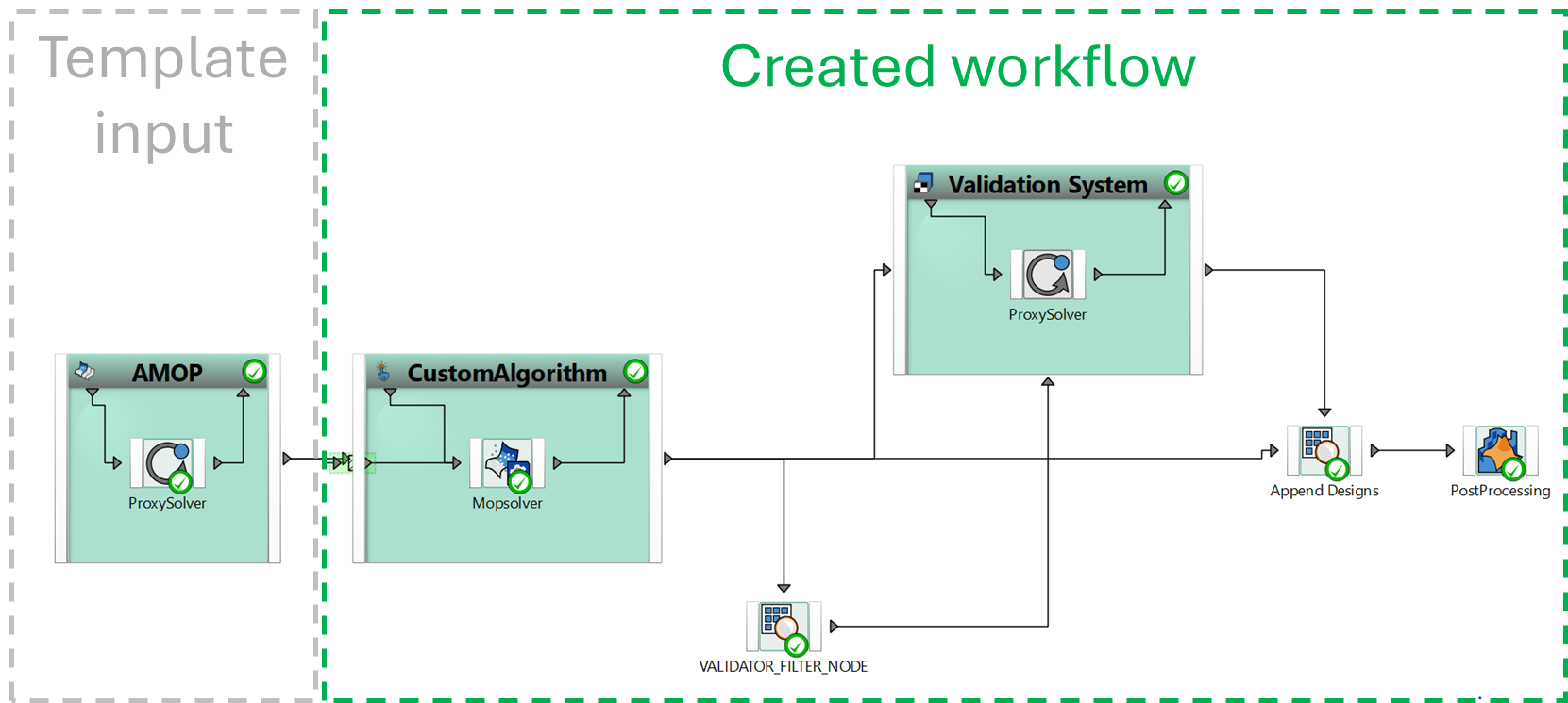
Optimization on MOP using a MOP solver to optimize design and ProxySolver for validation.
- Workflow: