
Note
Go to the end to download the full example code.
Proxy solver with Sensitivity#
This example demonstrates how to obtain designs from a parametric system and process them externally.
It creates a proxy solver node inside a Sensitivity parametric system and solves its designs externally. This is a unified approach for “optiSLang inside” solutions.
Workflow overview (mapped to code sections below):
“Perform required imports” – Import pyOptislang classes for workflow creation.
“Create solver” – Define a Python calculator function that serves as the external solver. This function receives design dicts with parameter values and returns response values.
“Create optiSLang instance” – Discover an optiSLang >= 25.1 installation and start a headless optiSLang server.
“Create workflow” – Build the parametric workflow:
Create a
Sensitivitysystem (node_types.Sensitivity) – Latin Hypercube sampling.Read and modify algorithm settings via
get_property("AlgorithmSettings"): setnum_discretizationto 2000 sampling points.Set fast-running solver properties (
AutoSaveMode,SolveTwice, etc.).Add a
ProxySolvernode (DesignFlow.RECEIVE_SEND) inside the Sensitivity system and configure batch size viaMultiDesignLaunchNum.Load 5 input parameters (X1..X5) and 1 response (Y) into the proxy solver via
load().Register them as system-level parameters/responses and set bounds [-3.14, 3.14].
Add a minimization criterion on Y.
“Run workflow” – Start the project in non-blocking mode and loop externally: poll
proxy_solver.get_designs(), compute responses via the calculator, and return results viaproxy_solver.set_designs()until the system finishes.“Stop and cancel project” – Dispose of the optiSLang instance.
Key APIs used:
node_types.Sensitivity– Sensitivity analysis algorithm (Latin Hypercube sampling)get_property("AlgorithmSettings")/set_property("AlgorithmSettings", ...)– read/write algorithm-specific settings (e.g.num_discretization)node_types.ProxySolverwithDesignFlow.RECEIVE_SEND– external solver integrationproxy_solver.get_designs()/proxy_solver.set_designs()– design exchange loopregister_locations_as_parameter()/register_locations_as_response()– register solver slots as system-level parameters and responses
Perform required imports#
Import the pyOptislang core classes: Optislang for server management,
node_types for algorithm and solver type constants,
DesignFlow/ParametricSystem/ProxySolverNode for workflow construction,
and parametric classes for defining parameters, criteria, and bounds.
import time

from ansys.optislang.core import Optislang
import ansys.optislang.core.node_types as node_types
from ansys.optislang.core.nodes import DesignFlow, ParametricSystem, ProxySolverNode
from ansys.optislang.core.project_parametric import (
    ComparisonType,
    ObjectiveCriterion,
    OptimizationParameter,
)
from ansys.optislang.core.utils import find_all_osl_exec
Create solver#
Define the external solver functions that will evaluate designs outside optiSLang.
calculator() computes response Y from 5 input parameters using a nonlinear formula.
calculate() processes a batch of design dicts received from the proxy solver:
each design contains hid (design ID) and parameters (list of name/value pairs).
It returns a list of result dicts with hid and responses (list of name/value pairs).
def calculator(hid, X1, X2, X3, X4, X5):
    from math import sin

    Y = 0.5 * X1 + X2 + 0.5 * X1 * X2 + 5 * sin(X3) + 0.2 * X4 + 0.1 * X5
    return Y


def calculate(designs):
    result_design_list = []
    print(f"Calculate {len(designs)} designs")
    for design in designs:
        hid = design["hid"]
        parameters = design["parameters"]
        X1 = 0.0
        X2 = 0.0
        X3 = 0.0
        X4 = 0.0
        X5 = 0.0
        for parameter in parameters:
            if parameter["name"] == "X1":
                X1 = parameter["value"]
            elif parameter["name"] == "X2":
                X2 = parameter["value"]
            elif parameter["name"] == "X3":
                X3 = parameter["value"]
            elif parameter["name"] == "X4":
                X4 = parameter["value"]
            elif parameter["name"] == "X5":
                X5 = parameter["value"]
        Y = calculator(hid, X1, X2, X3, X4, X5)

        result_design = {}
        result_design["hid"] = hid
        responses = [{"name": "Y", "value": Y}]
        result_design["responses"] = responses
        result_design_list.append(result_design)

    print(f"Return {len(result_design_list)} designs")
    return result_design_list
Create optiSLang instance#
Discover available optiSLang installations using find_all_osl_exec().
The ProxySolver node requires optiSLang >= 25R1 (version code 251).
Optislang(executable=...) starts a headless optiSLang server process
and establishes a TCP connection for remote control.
available_optislang_executables = find_all_osl_exec()
version, executables = available_optislang_executables.popitem(last=False)
if not version >= 251:
    raise KeyError("OptiSLang installation >= 25R1 wasn't found, please specify path manually.")

osl = Optislang(executable=executables[0])

print(f"Using optiSLang version {osl.osl_version_string}")
Create workflow#
Build the complete parametric workflow. The root system is the top-level container for all nodes in an optiSLang project.
root_system = osl.application.project.root_system

# **Step 4a: Create the Sensitivity algorithm system.**
# ``node_types.Sensitivity`` performs a design of experiments using Latin Hypercube sampling
# to explore the parameter space and compute sensitivity indices (e.g. CoP values).

algorithm_system: ParametricSystem = root_system.create_node(
    type_=node_types.Sensitivity, name="Sensitivity"
)

# **Step 4b: Read and modify algorithm settings.**
# ``get_property("AlgorithmSettings")`` returns the Sensitivity-specific settings dict.
# ``num_discretization`` controls the number of sampling points (default is lower; set to 2000
# for a more thorough exploration). The modified dict is written back with ``set_property()``.

num_discretization = 2000

algorithm_settings = algorithm_system.get_property("AlgorithmSettings")
algorithm_settings["num_discretization"] = num_discretization
algorithm_system.set_property("AlgorithmSettings", algorithm_settings)

# **Step 4c: Set fast-running solver properties.**
# These reduce I/O overhead for fast external solvers:
# - ``AutoSaveMode``: disable auto-saving to avoid filesystem delays.
# - ``SolveTwice``: re-evaluate the reference design for verification.
# - ``UpdateResultFile``: skip writing intermediate result files.
# - ``WriteDesignStartSetFlag``: skip writing start-set markers.

algorithm_system.set_property("AutoSaveMode", "no_auto_save")
algorithm_system.set_property("SolveTwice", True)
algorithm_system.set_property("UpdateResultFile", "never")
algorithm_system.set_property("WriteDesignStartSetFlag", False)

# **Step 4d: Add the Proxy Solver node.**
# The ``ProxySolver`` with ``DesignFlow.RECEIVE_SEND`` acts as a bridge: optiSLang sends
# designs to it, and the external Python code retrieves them via ``get_designs()``,
# evaluates them, and returns results via ``set_designs()``.
# ``MultiDesignLaunchNum`` controls the batch size (99 = up to 99 designs per batch;
# set to -1 to receive all pending designs at once).

proxy_solver: ProxySolverNode = algorithm_system.create_node(
    type_=node_types.ProxySolver, name="Calculator", design_flow=DesignFlow.RECEIVE_SEND
)

multi_design_launch_num = 99  # set -1 to solve all designs simultaneously
proxy_solver.set_property("MultiDesignLaunchNum", multi_design_launch_num)
proxy_solver.set_property("ForwardHPCLicenseContextEnvironment", True)

# **Step 4e: Load parameters and responses into the proxy solver.**
# Define 5 input parameters (X1..X5) with reference value 1.0 and 1 output response (Y)
# with reference value 3.0. The ``load()`` call configures the proxy solver's interface
# so optiSLang knows which values to send and expect back.

load_json = {}
load_json["parameters"] = []
load_json["responses"] = []

for i in range(1, 6):
    parameter = {"dir": {"value": "input"}, "name": f"X{i}", "value": 1.0}
    load_json["parameters"].append(parameter)

response = {"dir": {"value": "output"}, "name": "Y", "value": 3.0}
load_json["responses"].append(response)

proxy_solver.load(args=load_json)

# **Step 4f: Register parameters/responses and set bounds.**
# ``register_locations_as_parameter()`` promotes the proxy solver's input slots to
# system-level parameters visible to the Sensitivity algorithm.
# ``register_locations_as_response()`` does the same for outputs.
# Then modify each parameter to an ``OptimizationParameter`` with bounds [-3.14, 3.14].

proxy_solver.register_locations_as_parameter()
proxy_solver.register_locations_as_response()

for i in range(1, 6):
    algorithm_system.parameter_manager.modify_parameter(
        OptimizationParameter(name=f"X{i}", reference_value=1.0, range=(-3.14, 3.14))
    )

# **Step 4g: Add optimization criterion.**
# Add a minimization objective on the response Y. The Sensitivity algorithm will compute
# sensitivity metrics for this criterion across the sampled design space.

algorithm_system.criteria_manager.add_criterion(
    ObjectiveCriterion(name="obj", expression="Y", criterion=ComparisonType.MIN)
)
Optionally save project#
If you want to save the project to some desired location, uncomment and edit these lines:
dir_path = Path(r"<insert-desired-location>")
project_name = "proxy_solver_workflow.opf"
osl.application.save_as(dir_path / project_name)
Run workflow#
Step 5: Execute the workflow with the external proxy solver loop.
start(wait_for_finished=False) launches the optiSLang project execution in the background.
The while-loop then acts as the external solver: it polls get_designs() to receive
pending design batches from optiSLang, evaluates them with the calculate() function,
and returns the computed responses via set_designs().
The loop continues until get_status() reports "Processing done".
osl.application.project.start(wait_for_finished=False)

while not osl.project.root_system.get_status() == "Processing done":
    design_list = proxy_solver.get_designs()
    if len(design_list):
        responses_dict = calculate(design_list)
        proxy_solver.set_designs(responses_dict)
    # time.sleep(0.1)

print("Solved Successfully!")
Stop and cancel project#
Step 6: Dispose of the optiSLang instance.
dispose() stops the optiSLang server process and cleans up resources.
osl.dispose()
View generated workflow#
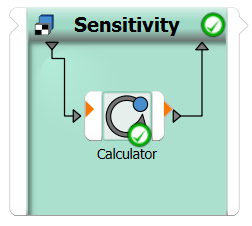
This image shows the generated workflow. However, it is important to note, that this workflow is only usable through pyoptislang and cannot be used interactively!